
Voice Agents — Exploring Pipecat for Realtime Voice Agents
In the previous articles, we looked at voice agents from several angles: what they are, how realtime voice architectures are evolving, and how a realtime architecture can be applied to an AI mock interview product.
The next step is to look at tooling.
When building a voice agent, the difficult part is not only choosing a speech-to-text provider, an LLM, or a text-to-speech model. The difficult part is assembling these pieces into a realtime conversation system.
Audio arrives continuously. Transcripts may be partial. The model may stream output. The user may interrupt. The agent may need to stop speaking, update state, and continue the conversation.
In this article, I want to explore Pipecat as an open-source framework for realtime voice and multimodal agents.
The goal is to understand what Pipecat is, how its mental model works, what kind of agent pipelines it can support, and how to run a simple local voice agent using the classic STT → LLM → TTS flow.
What Pipecat Is
Pipecat is an open-source Python framework for building realtime voice and multimodal AI agents.
- It is not a speech-to-text model.
- It is not a large language model.
- It is not a text-to-speech model.
The easiest way to understand Pipecat is as a pipeline framework for realtime AI conversations.
It helps connect several moving parts:
- Network transport
- Audio processing
- Speech-to-text
- LLM or realtime model
- Text-to-speech
- Conversation context
- Custom processing logic
- Multimodal services
Pipecat’s own documentation describes it as a framework that orchestrates AI services, network transports, and audio processing for low-latency conversations.
Voice agents are not just model calls. They are streaming systems. The application needs a way to move audio, text, events, control signals, and generated responses through a pipeline while the conversation is still happening.
It can be used for simple voice assistants, phone agents, browser-based agents, multimodal applications, video/avatar experiences, and more structured conversation flows.
The Core Mental Model
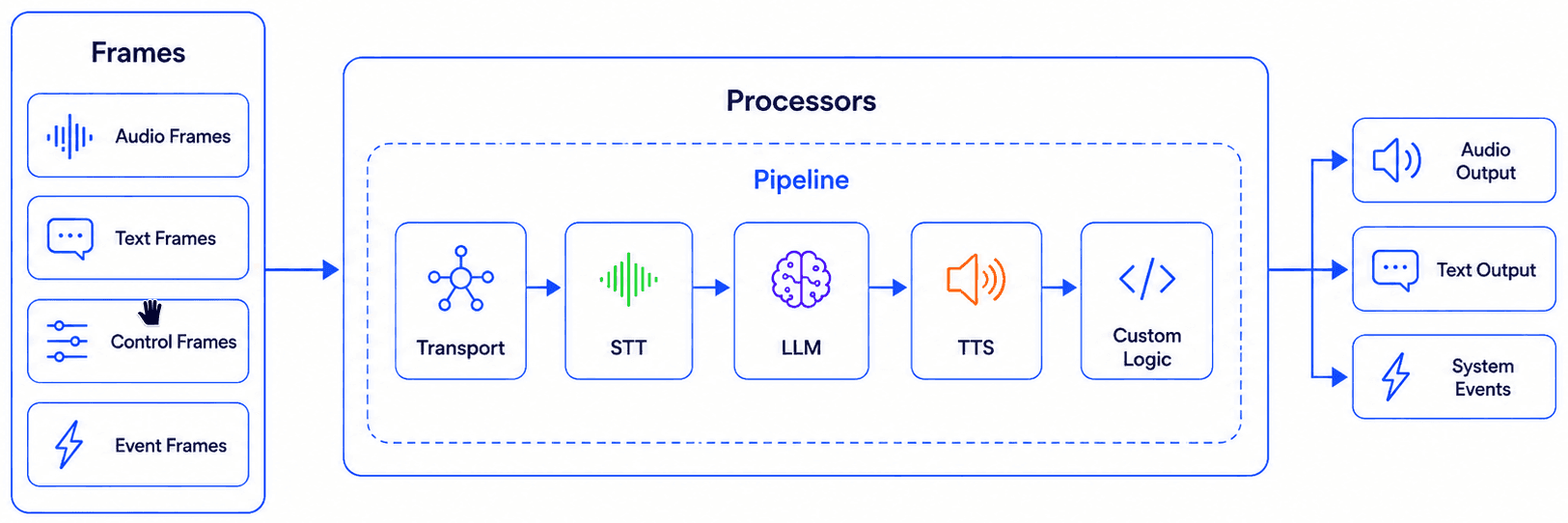
The core Pipecat mental model has three important concepts:
- Frames
- Processors
- Pipeline
These are the pieces that make Pipecat different from a simple request/response backend.
Frames
A frame is the basic unit of information moving through a Pipecat pipeline.
A frame can represent many things: audio, text, image data, user input, model output, control signals, or system events.
This model fits voice agents because a conversation does not arrive as one clean request.
The user speaks over time. The microphone sends audio chunks. The speech-to-text service may emit partial transcripts. The model may stream text. The text-to-speech service may emit audio in pieces. The system may also need to handle interruption, startup, shutdown, speaking state, or error events.
Processors
Processors handle frames.
A processor receives a frame, does something with it, and passes the result forward.
For example, one processor may receive audio frames and send them to a speech-to-text service. Another processor may receive transcription frames and update conversation context. Another may call an LLM. Another may convert text into speech.
Processors can also be custom.
A product team could add processors for logging, filtering, metrics, session state, transcript capture, user intent handling, evaluation, or other product-specific behavior.
The framework provides the pipeline structure, but the application can still define its own behavior.
Pipeline
A pipeline connects processors together.
For a simple cascaded voice agent, the pipeline may be:
Transport, then speech-to-text, then LLM, then text-to-speech, then transport output.
That is the classic architecture:
User speech → STT → LLM → TTS → spoken responseThis is the easiest architecture to understand and the one we will try locally in this article.
But Pipecat is not limited to this shape.
A pipeline can include voice activity detection, turn detection, context aggregation, custom processors, memory, monitoring, video/avatar services, or speech-to-speech models.
Local Try-Out: STT → LLM → TTS
Now let’s run a simple local voice agent.
This quick try-out uses the classic cascaded architecture:
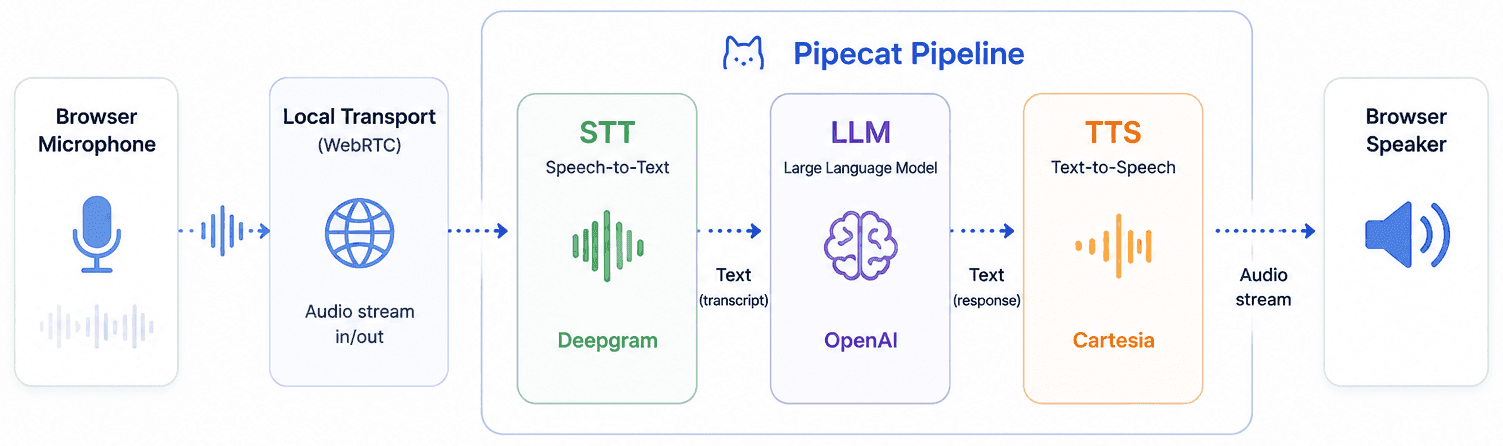
I choose this architecture for the first experiment because it is easy to inspect and reason about.
The browser captures your microphone. The transport sends audio into the pipeline. Speech-to-text converts speech into text. The LLM generates a response. Text-to-speech converts the response into audio. The browser plays the generated voice.
This is only one architecture Pipecat supports, but it is the best entry point.
Requirements
- Python 3.11 or later
- uv
- Pipecat CLI
- Deepgram API key for speech-to-text
- OpenAI API key for the LLM
- Cartesia API key for text-to-speech
The provider choices are not the main point of this article. They are simply the services used by the quickstart template.
Install the Pipecat CLI
uv tool install pipecat-ai-cliCheck that the CLI is available:
pipecat --versionCreate the Quickstart Project
pipecat init quickstart
cd pipecat-quickstart
The exact project structure may change as Pipecat evolves, but the quickstart flow is designed to scaffold a working voice-agent project.
Configure Environment Variables
Create your environment file:
cp env.example .envThen add the provider keys:
DEEPGRAM_API_KEY=your_deepgram_api_key
OPENAI_API_KEY=your_openai_api_key
CARTESIA_API_KEY=your_cartesia_api_key
Install Dependencies and Run
uv sync
uv run bot.py
The quickstart should start a local WebRTC server and print a local browser URL similar to:
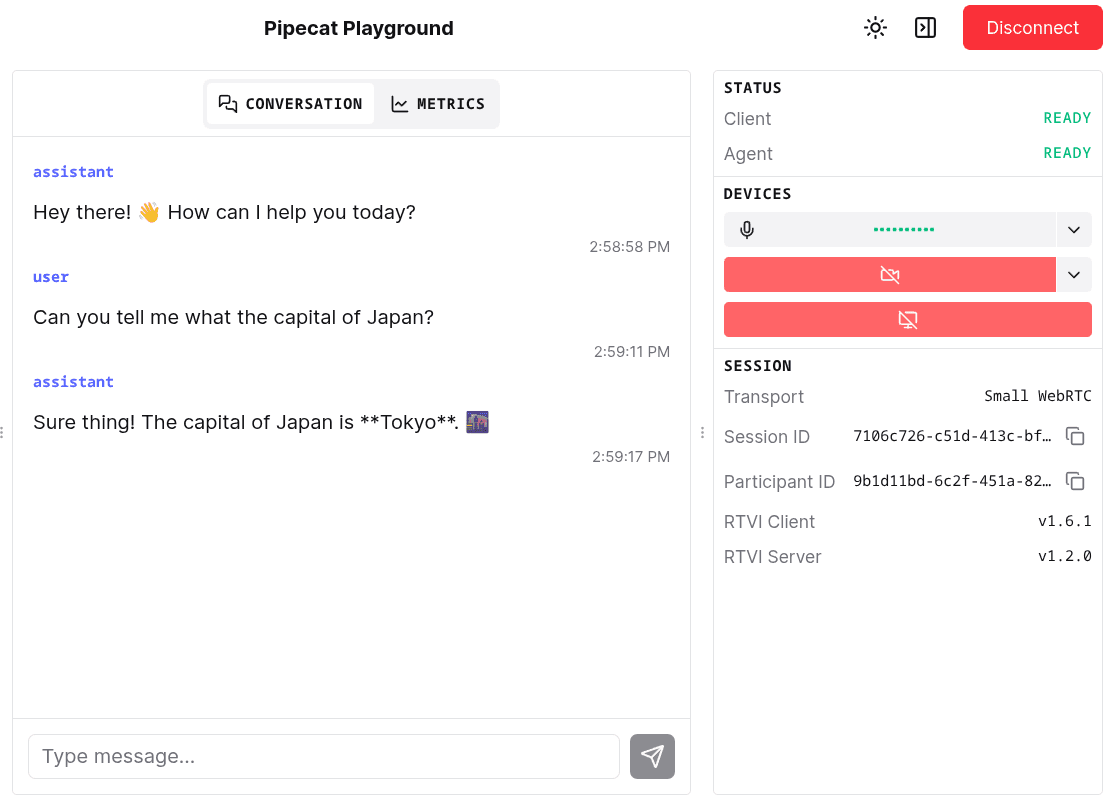
http://localhost:7860Open the URL in the browser, allow microphone access, and start speaking with the bot. If all went well, you can see UI similar to this.
What Happens at Runtime

At runtime, the quickstart turns the abstract architecture into a working local conversation.
The browser captures microphone audio and sends it through the local transport. Pipecat processes the audio through the pipeline. The speech-to-text service produces a transcript. The LLM generates a response. The text-to-speech service produces audio. The browser plays the generated speech.
In Pipecat terms, audio and events are moving through the pipeline as frames, handled by processors.
Once the basic loop works, you can start experimenting: change the prompt, swap providers, adjust the voice, inspect latency, add product-specific logic, or explore more advanced pipeline shapes.
Beyond the Basic Pipeline
The local quickstart uses STT → LLM → TTS, but Pipecat is broader than that.
Pipecat’s supported services cover many categories: transports, speech-to-text, LLMs, text-to-speech, speech-to-speech, image generation, video/avatar services, memory, vision, and monitoring.
Transport Options
Transport is the entry and exit point of the conversation.
Different products may need different transports.
- A browser voice assistant may use WebRTC.
- A prototype may use WebSocket.
- A phone agent may need telephony integration.
- A video-avatar agent may need a transport that carries synchronized audio/video interaction.
Pipecat supports multiple transport integrations, including WebRTC, WebSocket-based transports...
This is useful when exploring different voice-agent surfaces. The same general pipeline idea can appear in different communication environments.
AI Services
Pipecat also supports many AI service integrations.
For a cascaded pipeline, the core categories are speech-to-text, LLM, and text-to-speech.
For speech-to-text, the supported services include providers such as Deepgram, AssemblyAI, Azure, Google, OpenAI, Whisper, AWS Transcribe, Speechmatics, and Soniox...
A voice agent team often needs to compare provider combinations:
- Which speech-to-text provider handles accents better?
- Which text-to-speech provider has lower time-to-first-audio?
- Which LLM gives better task behavior?
- Which combination gives the best cost and latency balance?
A framework cannot make those choices automatically, but it can make experiments easier to run.
Speech-to-Speech
The quickstart uses a modular STT → LLM → TTS pipeline, but Pipecat also supports speech-to-speech services.
The supported services include providers such as AWS Nova Sonic, Gemini Live, Gemini Live Vertex AI, OpenAI Realtime, Ultravox, Grok Voice Agent, and others.
That means Pipecat can be used to explore both sides of the architecture spectrum:
- Classic cascaded pipelines with separate STT, LLM, and TTS components.
- More integrated realtime audio models that accept speech input and produce speech output more directly.
This is important because voice-agent architecture is not moving in only one direction.
Some products will still prefer modular pipelines for control, debugging, transcripts, provider flexibility, and evaluation.
Other products may prefer speech-to-speech models for naturalness, lower perceived latency, emotion, prosody, or realtime conversation quality.
Pipecat can be used as a framework for exploring these choices.
Multimodal Extensions
Pipecat also reaches beyond voice.
Its supported service list includes video/avatar services, vision, memory, image generation, and analytics/monitoring integrations.
That points toward a broader category: realtime multimodal agents.
A future agent may not only hear and speak. It may also see the user, observe the screen, control an avatar, remember prior conversations, and produce structured events for monitoring.
Where Pipecat Helps
Pipecat is useful because it gives a repeatable structure for realtime voice-agent experiments.
Instead of manually connecting every transport, provider, and event path from scratch, Pipecat gives a pipeline model that can be extended.
Reusable Pipeline Structure
The pipeline model gives the application a clear shape.
Audio enters through a transport. Processors handle frames. AI services transform the data. The result flows back to the user.
That structure is easier to reason about than a collection of unrelated callbacks and provider SDK calls.
Faster Provider Experiments
Voice-agent development often requires trying multiple providers.
One speech-to-text service may work well for English but poorly for noisy environments. One text-to-speech provider may sound natural but have higher latency. One LLM may produce better answers but cost more.
Pipecat’s service model gives a cleaner starting point for those experiments.
Clearer Mental Model
Frames, processors, and pipelines are useful concepts.
They match the nature of realtime voice systems better than a simple request/response mental model.
The user does not send a single message. They speak over time.
The agent does not only produce one final output. It may stream, pause, interrupt, resume, or update state.
A pipeline model makes those behaviors easier to discuss and design.
Room for Product Logic
A framework can organize the pipeline, but the product still defines the experience.
A tutor, interviewer, support agent, sales assistant, and healthcare intake agent may use similar voice infrastructure, but their behavior is different.
The product still needs its own prompts, tools, memory, business rules, evaluation logic, and user experience.
Pipecat gives a structure to build on.
It does not replace product design.
What Still Needs Validation
A local quickstart is useful, but it does not answer every production question.
The next step is to test the framework under real product constraints.
Latency should be measured end to end, not only inside one provider call. Interruption handling should be tested with real speaking behavior, background noise, and users who do not wait politely for the agent to finish. Observability should show where time is spent across transport, transcription, LLM, TTS, buffering, and playback.
Scaling also needs validation.
A local bot and a production service with many concurrent sessions are different problems.
Cost needs attention too, especially when every conversation may use multiple paid services.
Closing
Pipecat is a useful framework to explore because it makes realtime voice-agent pipelines more concrete.
Pipecat also supports different transports, speech-to-speech services, multimodal extensions, memory, vision, and monitoring integrations.
The most useful mental model is frames, processors, and pipelines.
Once that model is clear, voice agents become easier to reason about: audio enters the system, frames move through processors, AI services transform the stream, and the result returns to the user.
References
[1] Pipecat — Documentation