
Voice Agents — Part 2: How Realtime Voice Architectures Are Evolving
In Part 1, we introduced the basic idea of an AI voice agent: a system that can listen, understand, reason, respond, and sometimes take action through spoken conversation. But once we move beyond the definition, the next question is more architectural:
How should a voice agent actually be built?
At first glance, the answer seems simple. The system receives user speech, converts it to text, sends that text to an LLM, converts the response back to speech, and plays it to the user.
That is the classic voice-agent pipeline:
Speech → STT → LLM → TTS → SpeechBut voice agents are evolving quickly. We are now seeing multiple architecture patterns. That is what this article explores.
1. The Classic Cascaded Pipeline
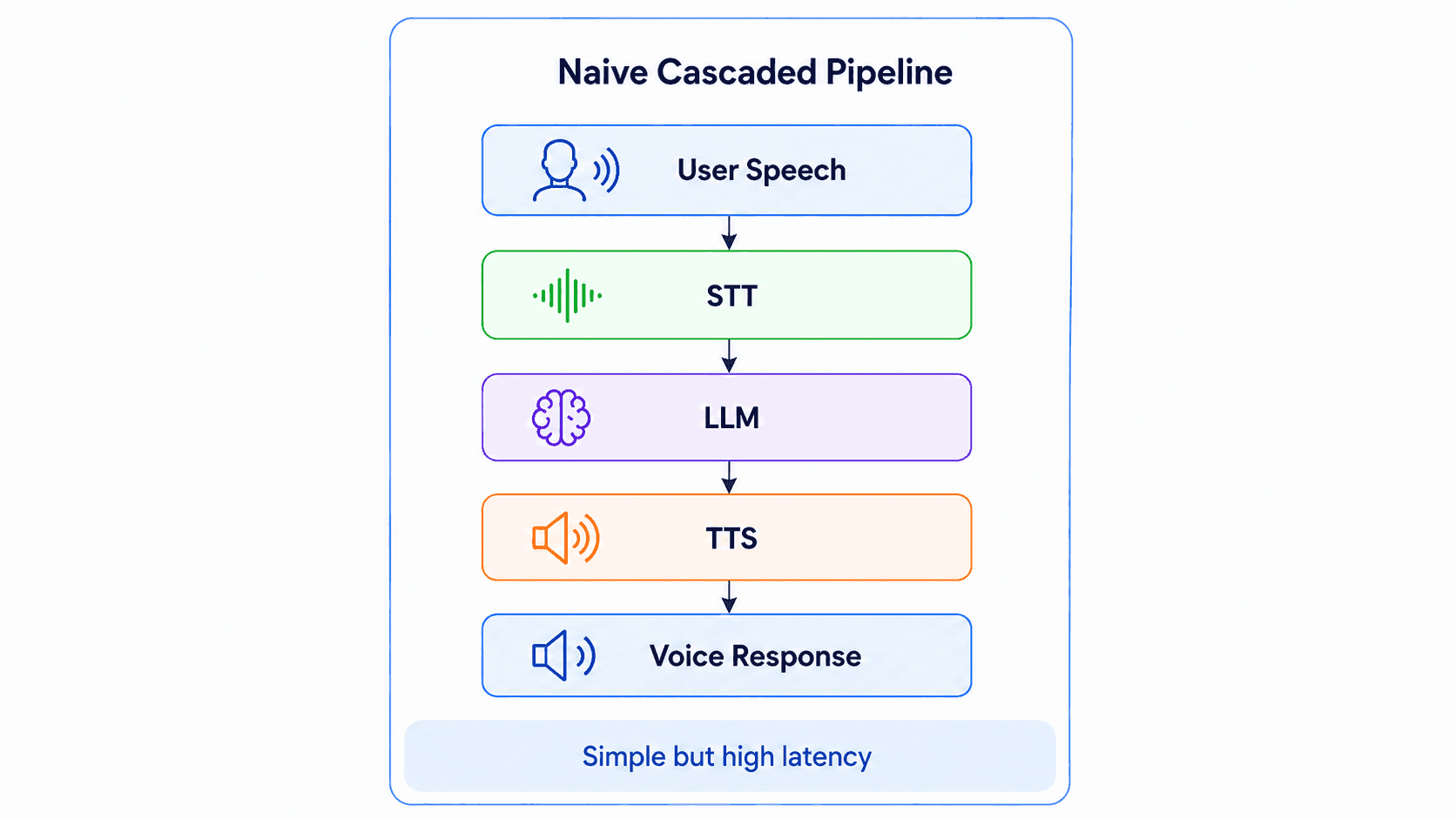
It has three major AI components:
- Speech-to-Text (STT / ASR) converts the user’s voice into text.
- LLM / Agent Brain understands the text, reasons about it, and decides what to say or do.
- Text-to-Speech (TTS) converts the response back into audio.
This is often described as:
- STT / ASR as the ear
- LLM as the brain
- TTS as the mouth
This architecture is easy to understand because each component has a clear responsibility. For many products, this is still the most practical starting point.
Why It Works
The cascaded pipeline is popular because it is modular. You can choose different providers or models for each layer:
- One STT provider for transcription
- One LLM for reasoning
- One TTS provider for voice quality
- Your own backend for business logic and tools
This gives teams flexibility.
It also makes debugging easier.If the agent gives a bad answer, you can inspect the transcript. If the transcript is wrong, you know the problem may be in STT. If the text response is correct but the audio sounds strange, the issue may be in TTS. This is valuable in real products.
What It Solves
The classic cascaded pipeline solves the basic voice-agent problem:
How do we connect human speech to an LLM-based application?
It lets teams reuse the same patterns they already use for text-based agents:
- Prompting
- Tool calling
- Retrieval
- Business workflows
- Conversation memory
- ...
Limitations
The downside is latency.
A naive cascaded pipeline often behaves like a batch process:
- Wait for the user to finish speaking.
- Transcribe the full audio.
- Wait for the full LLM response.
- Generate the full TTS audio.
- Play the response.
This works, but it does not feel conversational. Human conversation is not a batch process.
We do not wait for someone to produce a perfect paragraph before we start understanding. We listen while they speak. We infer intent early. We prepare a response. We interrupt when needed. We react to timing, emotion, confidence, and hesitation.
A basic cascaded pipeline can miss that feeling. The next evolution is to make the pipeline stream.
2. The Streaming Cascaded Pipeline
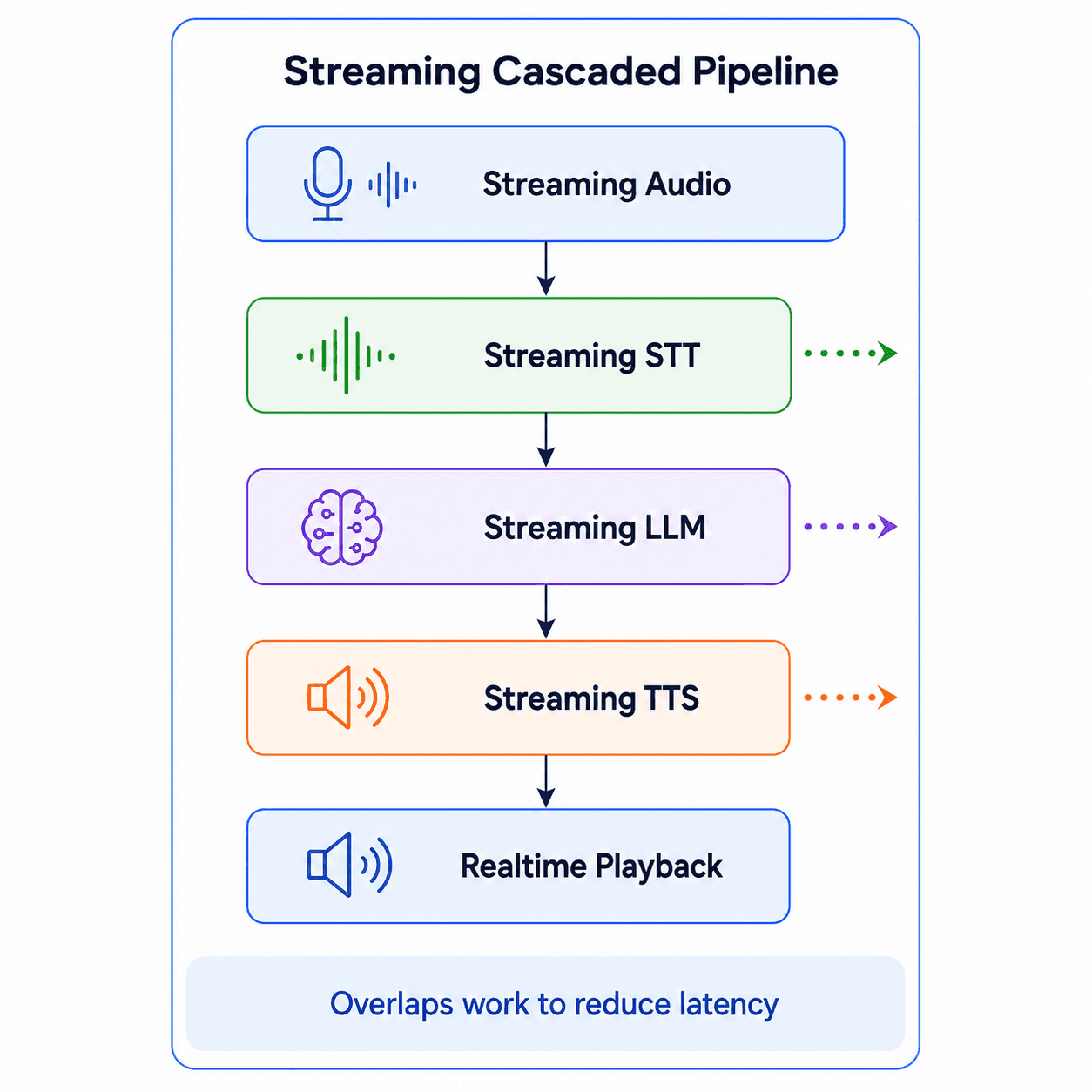
Instead of waiting for each stage to finish completely, each component streams partial output to the next component.
The sequence is still familiar. But the behavior is very different.
The user’s audio is streamed while they speak. The STT system produces partial or final transcripts. The LLM starts generating before the entire interaction becomes a large batch. The TTS system starts producing audio from chunks of text. The user hears the response earlier.
The key idea is simple:
Realtime behavior does not come from one magical fast model. It comes from streaming and pipelining across the system.
Why Streaming Matters
Latency in voice agents is cumulative. The total delay may include:
- Audio capture delay
- Network delay
- STT latency
- LLM time-to-first-token
- Tool-calling latency
- TTS time-to-first-audio
- Audio buffering
- Playback delay
Even if each part looks acceptable individually, the complete system may still feel slow. A streaming pipeline reduces perceived latency by overlapping work.
The system does not wait until everything is finished. It starts processing as soon as it has enough information.
That is closer to how human conversation works.
Sentence Buffering
One practical detail in streaming architectures is the buffer between the LLM and TTS.
LLMs usually stream tokens. TTS systems usually work better with meaningful chunks of text.
If you send every token directly into TTS, the speech may sound unnatural or unstable. If you wait for the entire answer, latency increases.
A common pattern is:
Streaming LLM tokens → Sentence or phrase buffer → Streaming TTSThe buffer collects tokens until it has a speakable unit, such as a sentence or phrase, then sends that unit to TTS.
This is not a glamorous architecture component, but it matters.
Voice-agent quality often depends on these small orchestration details:
- When to start speaking
- How much text to buffer
- When to interrupt playback
- When to cancel generation
- How to handle incomplete sentences
- How to recover from user interruption
This is where many demos start to become real products in the next evolution.
3. Realtime Pipeline With Conversation Control
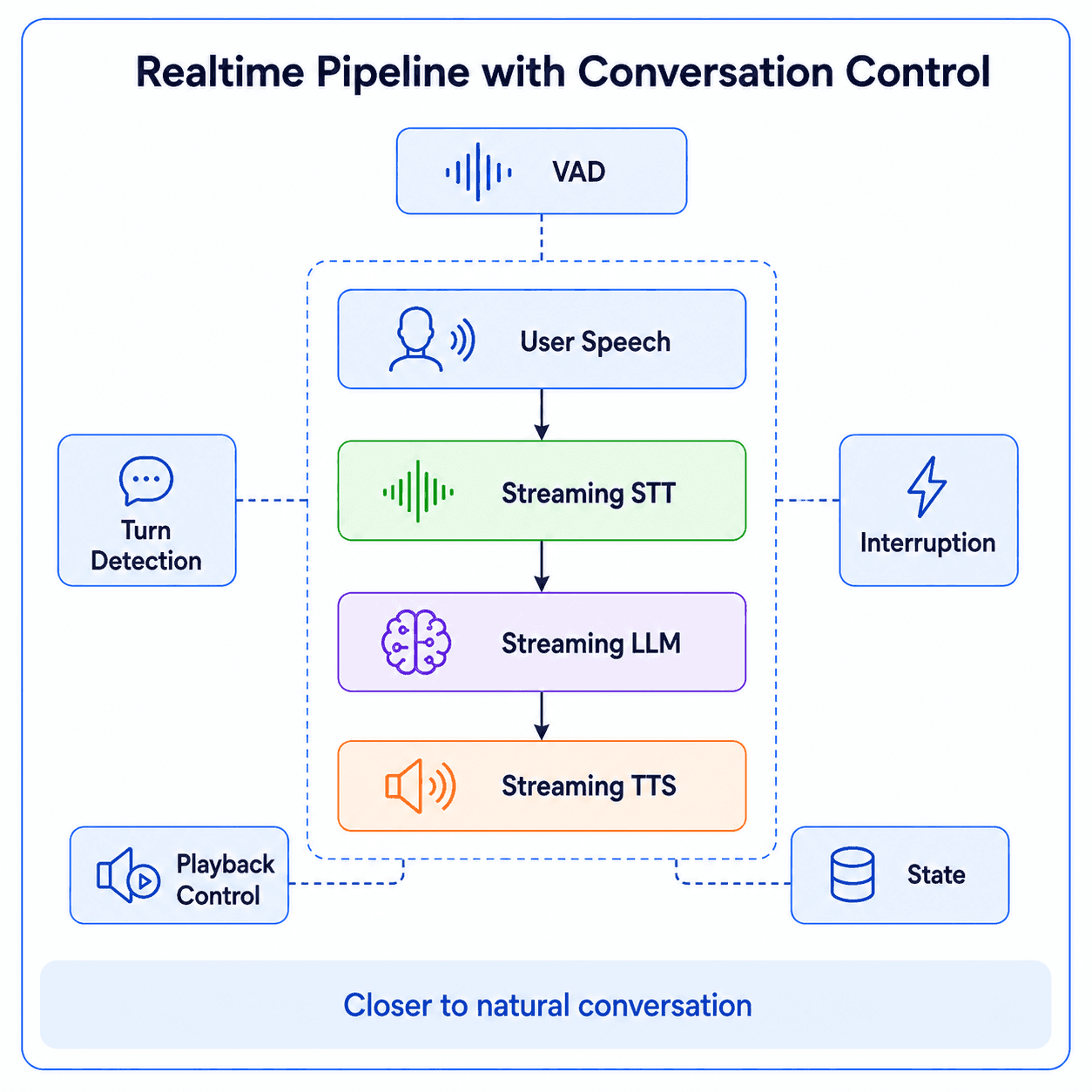
A streaming STT, LLM, and TTS pipeline is a good start, but it is not enough. A real voice agent also needs conversation control.
That means the system must manage the interaction state between user and agent.
A simplified state flow may look like this:
Idle → Listening → Processing → Speaking → IdleBut real conversations are not always that clean.
The user may interrupt the agent. The user may pause without finishing. The user may speak over the agent. The user may change topic mid-sentence. The user may be in a noisy environment.
The agent may need to stop speaking, cancel the previous response, listen again, and generate a new response based on the latest user input.
This is where voice agents become more than an STT + LLM + TTS demo.
Turn Detection
A voice agent needs to understand when the user has finished speaking.
This is harder than it sounds.
A short pause does not always mean the user is done. In natural speech, people pause to think. They hesitate. They correct themselves. They restart sentences.
If the agent responds too early, it feels rude. If the agent waits too long, it feels slow.
Good turn detection is part speech processing, part UX, and part product design.
Interruption Handling
Interruption handling, sometimes called barge-in, is another critical piece.
In real conversation, users often interrupt:
- To correct themselves
- To stop the agent
- To ask a follow-up question
- To change the topic
- To clarify something
A voice agent that cannot handle interruption feels robotic.
A good system should be able to:
- Detect user speech while the agent is speaking
- Stop or fade out the current audio
- Cancel or revise the current LLM/TTS generation
- Update conversation state
- Resume listening immediately
This is one of the major differences between “it works” and “it feels natural.”
VAD, Noise, and Audio Events
Voice Activity Detection, or VAD, is often used to detect when speech starts and stops.
But VAD alone is not enough for high-quality interaction.
A production system may also need:
- Noise suppression
- Echo cancellation
- Microphone handling
- Playback control
- Conversation state
- Background speech filtering
- ...
These details are easy to ignore in a demo, but they become important in real deployments.
The architecture evolves from a simple pipeline into an interactive realtime system.
4. Audio LLMs and Speech-I/O Models
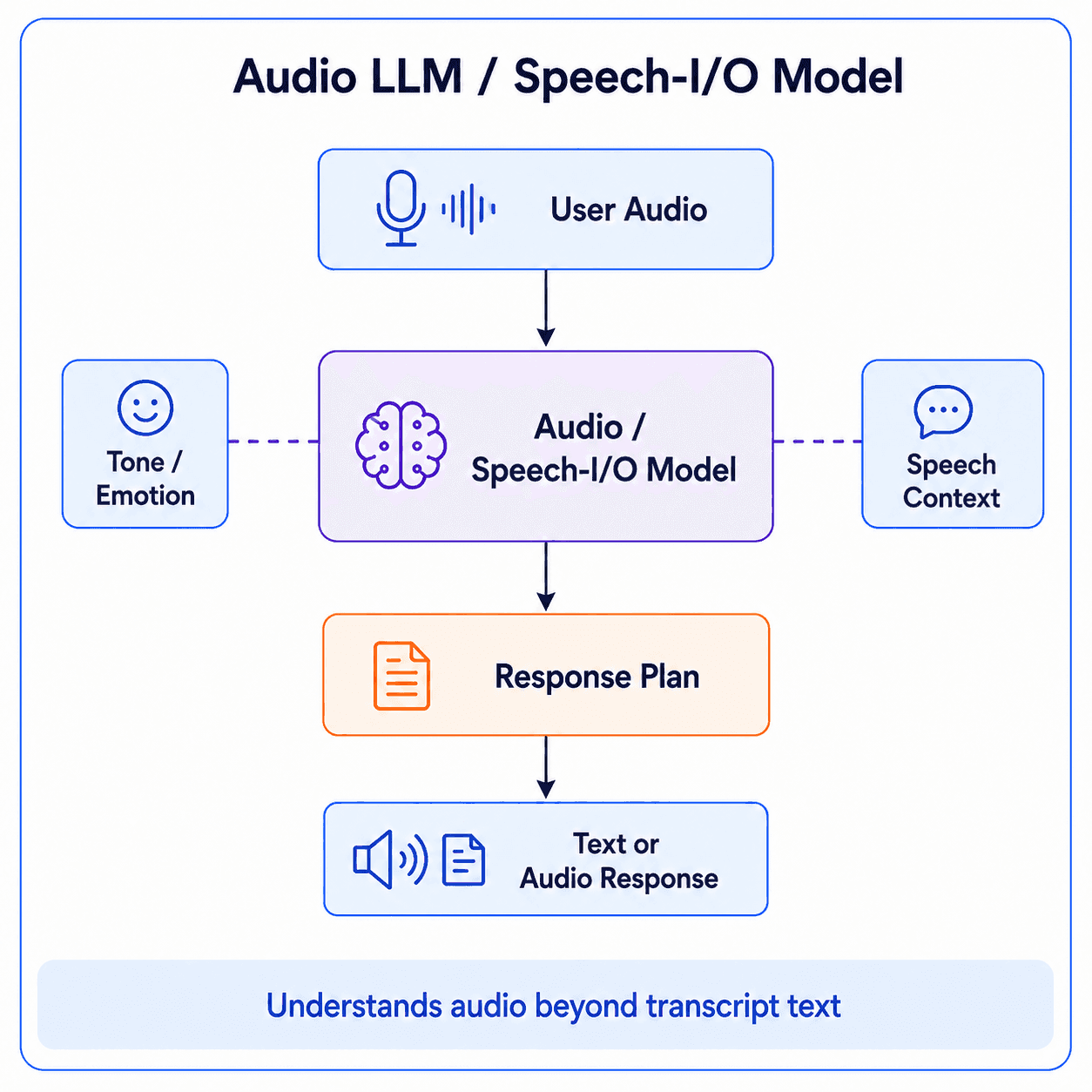
Instead of converting speech into text before the LLM, the model can process audio more directly.
This approach tries to reduce the gap between speech and reasoning.
Traditional pipelines turn the user’s voice into text. That is useful, but it also loses information.
Speech contains signals that are not fully captured by text:
- Tone
- Emotion
- Hesitation
- Rhythm
- Stress
- Background context
- ...
When audio is reduced to a transcript, some of that information disappears.
Audio-capable models try to preserve more of the original speech signal.
What This Solves
Audio LLMs can potentially solve several problems:
- Better understanding of spoken input
- Less dependency on perfect transcription
- More natural conversational behavior
- Better handling of tone and speech context
- More direct multimodal interaction
- Lower handoff complexity between STT and reasoning
This is especially useful when the user’s tone or delivery matters.
For example, in a language learning app, the system may care about pronunciation, fluency, hesitation, confidence, and rhythm.
In a mock interview product, the system may care not only about answer content, but also clarity, pacing, and confidence.
In a customer support scenario, the system may need to detect frustration or urgency.
Those are not purely text problems.
Tradeoffs
The tradeoff is control.
With a separate STT layer, you can inspect the transcript. You can evaluate it. You can store it. You can apply compliance rules. You can change providers.
With an audio-native model, some of that behavior may move inside the model.
That can make the experience more natural, but it may also make the system harder to debug.
The architecture becomes more integrated, but less modular.
5. Native Speech-to-Speech Models
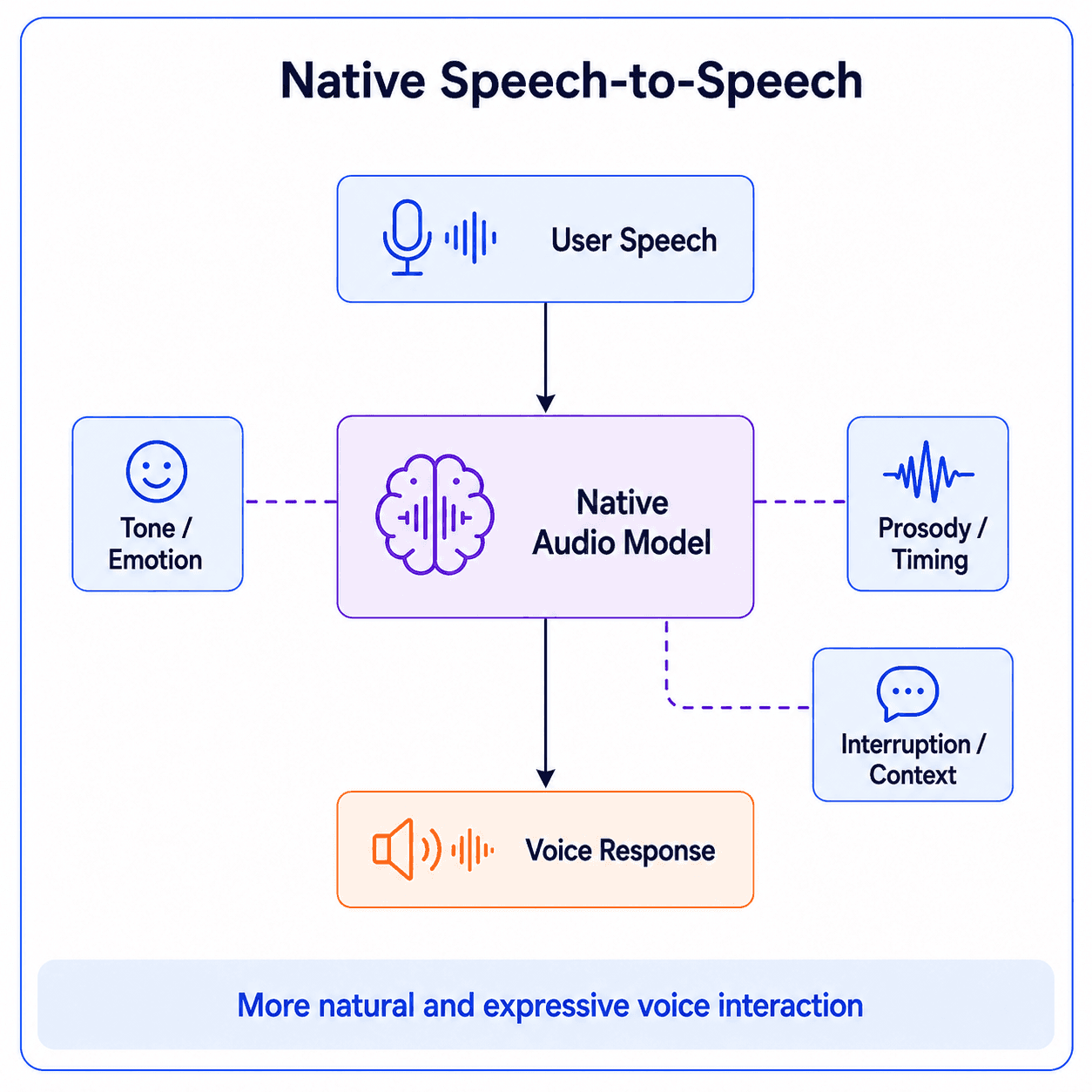
Audio LLMs and speech-I/O models are a bridge between classic cascaded pipelines and fully native speech-to-speech systems. They allow the model to understand audio more directly, but may still rely on text-like reasoning or intermediate outputs. Native speech-to-speech models go further: they are designed for speech-in, speech-out interaction, where tone, emotion, timing, and prosody can become part of the conversation itself.
This is the architecture that feels closest to the long-term vision of voice agents.
The user speaks. The model understands speech. The model responds with speech. The conversation feels more fluid and human-like.
What Speech-to-Speech Tries to Solve
Native speech-to-speech systems are not only about reducing latency. They also try to make voice interaction more natural.
They may preserve or model information such as:
- Emotion
- Tone
- Speaking style
- Timing
- Interruptions
- User intent from voice
- Non-textual audio cues
This is important because human conversation is not only words.
Two users can say the same sentence with completely different meanings depending on tone and context.
Text loses much of that.
Native audio models try to keep more of it.
Google Gemini Live API and Native Audio
Google’s Gemini Live API is a good example of this direction.
It supports low-latency, realtime voice and vision interactions with Gemini. It can process continuous streams of audio, images, video, and text to deliver spoken responses.
Google has also described native audio capabilities such as Affective Dialogue and Proactive Audio.
Affective Dialogue means the model can adapt based on the emotional tone of the user’s voice.
Proactive Audio means the model can better decide when to respond and when to ignore irrelevant background speech.
These capabilities show where voice agents are going.
The goal is not only faster speech generation. The goal is a more human-like conversational system
For use cases such as education, coaching, customer support, and interview practice, this matters.
A good voice agent should not only answer correctly. It should respond at the right time, with the right tone, in a way that fits the user’s situation.
OpenAI Realtime and Similar Platforms
OpenAI’s Realtime API is another example of this direction.
It supports realtime voice-agent sessions and can connect through WebRTC, WebSocket, or SIP depending on the use case. It also supports voice activity detection, conversation state, tool calling, and realtime speech interactions.
OpenAI’s newer realtime audio models are positioned around live voice tasks such as speech-to-speech interaction, realtime translation, and transcription.
This is important because modern voice agents are not only conversational interfaces. They increasingly need to act.
A production voice agent needs both natural speech and reliable agent behavior.
Other Platforms in This Direction
There are also other platforms moving toward realtime voice and speech-native interaction:
- Microsoft Azure Voice Live API
- ElevenLabs Conversational AI
- LiveKit Agents
- Pipecat
- Deepgram voice and speech APIs
- Cloudflare RealtimeKit
- ...
Each platform has a different focus.
Some focus on voice quality. Some focus on realtime communication. Some focus on emotional intelligence. Some focus on developer infrastructure. Some focus on telephony and contact centers. Some focus on open-source orchestration.
For now, the key point is that the voice-agent ecosystem is moving from simple pipelines toward integrated realtime audio systems.
6. A Practical Comparison
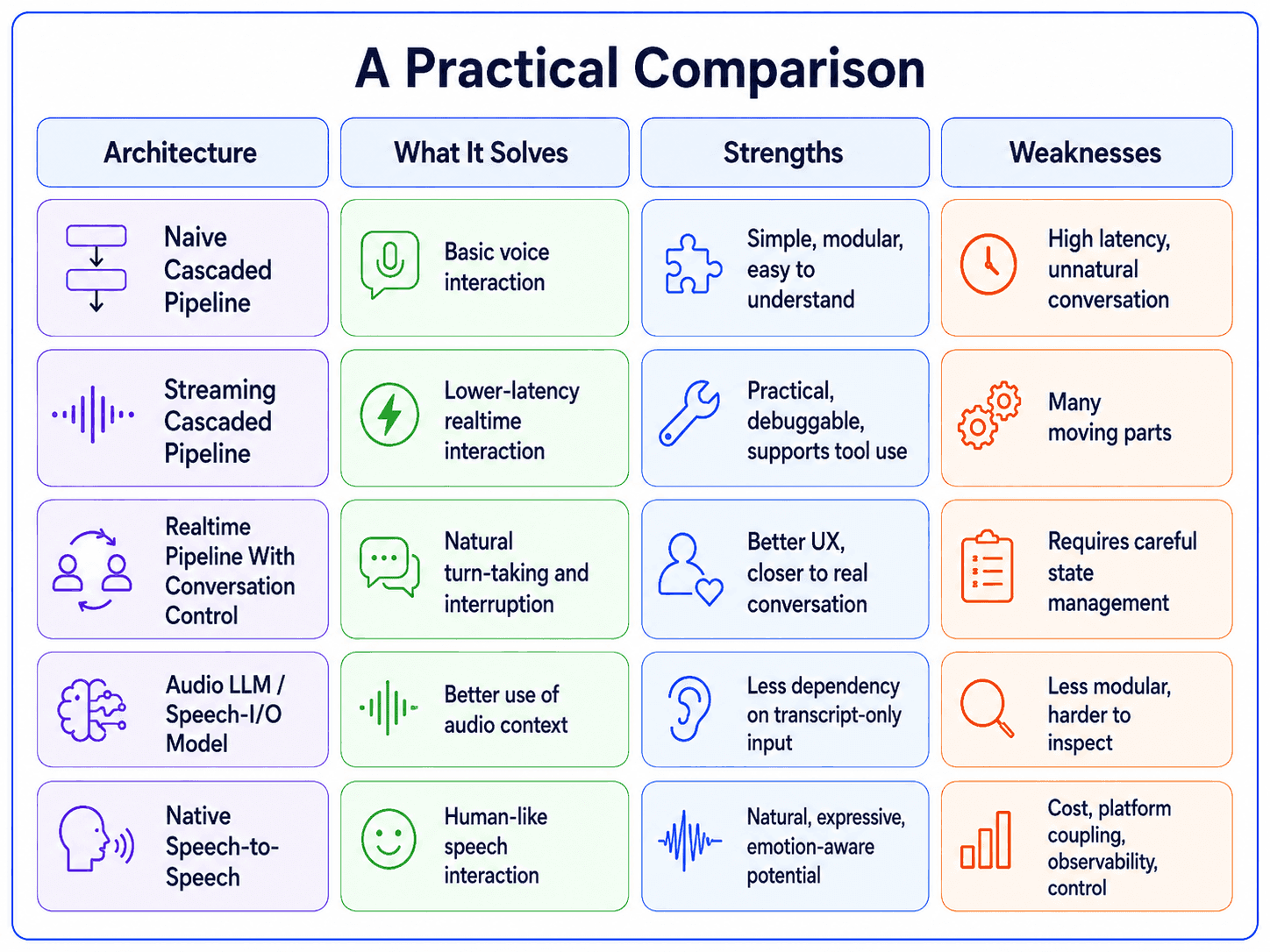
The best architecture depends on the product.
A customer-support phone agent may have different requirements from an education app.
A language-learning assistant may care heavily about pronunciation, emotion, and speaking rhythm.
A mock interview system may care about transcripts, evaluation, scoring, and feedback.
An enterprise assistant may care more about tool calling, auditability, compliance, and workflow integration.
There is no single best architecture for all voice agents.
There is only the best architecture for a specific product constraint.
7. What This Means for Builders
If you are building a voice agent today, I would not start by asking:
Should we use speech-to-speech or STT + LLM + TTS?
I would start with product requirements.
Ask:
- Do we need tool calling?
- Do we need low latency?
- Do we need emotional awareness?
- Do we need human handoff?
- Do we need to control cost carefully?
- ...
The right choice depends on the product you are building.
For many teams, a streaming cascaded pipeline is still a strong starting point. It is modular, practical, and easier to reason about.
For products where naturalness, emotion, and speech quality are central, native audio models and speech-to-speech systems are becoming increasingly attractive.
In practice, we may also see hybrid architectures.
In the next articles, we will move from architecture concepts into the technical and practical layers of voice agents: WebRTC, WebSocket, STT, TTS, LLM orchestration, realtime conversation control, and hands-on experiments with frameworks like LiveKit and Pipecat.
References
[1] Hugging Face — Deep Dive into Voice Agents
[2] arXiv — Building Enterprise Realtime Voice Agents from Scratch: A Technical Tutorial
[3] Google AI for Developers — Gemini Live API
[4] OpenAI Developers — Realtime and Audio Guide